
RF Link Budget Calculation for Outdoor Wireless Links
An RF link budget accounts for the gains and losses between a radio transmitter and receiver to estimate whether a proposed wireless link can deliver sufficient received signal strength and operating margin. It is one of the fundamental calculations used when designing point-to-point, outdoor and industrial wireless links.
A complete RF link budget calculation considers transmit power, antenna gains, cable and connector losses, propagation loss, receiver sensitivity and the margin available between predicted received power and the level required by the radio.
This engineering guide explains the calculation process together with free-space path loss (FSPL), Fresnel-zone clearance, antenna effects, RSSI, SNR, link margin, fade margin and practical throughput considerations for real-world wireless deployments.
RF Link Budget — Quick Definition
RF Link Budget = Transmit Power + Antenna Gains − Propagation and System Losses. The predicted received signal can then be compared with the receiver requirement to determine how much operating margin is available.
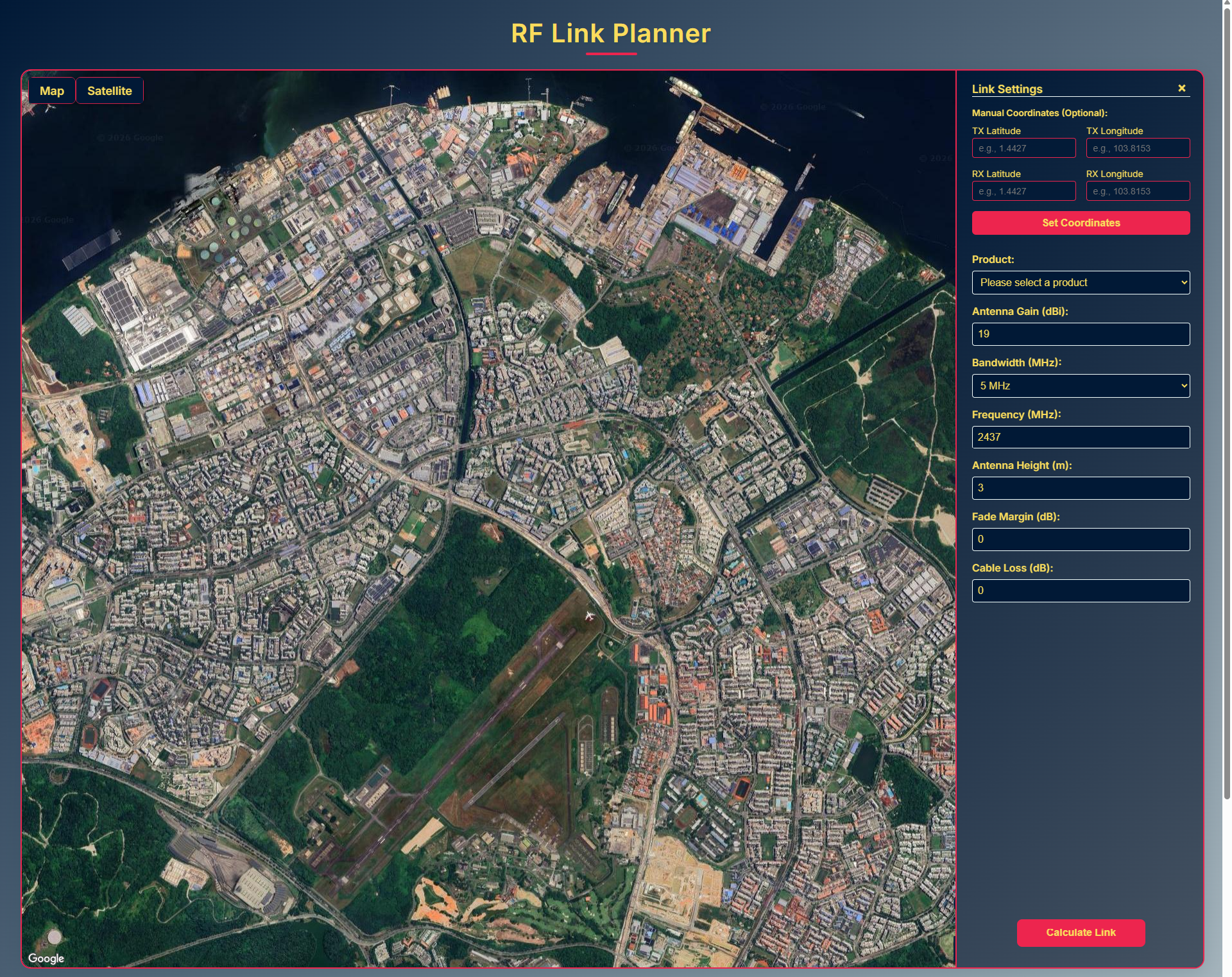
Calculate Your Wireless Link Before Deployment
Use the Vizmonet RF Link Planner to apply link-budget concepts to a proposed wireless connection and evaluate important RF parameters during early-stage network planning.
1. What Is an RF Link Budget?
An RF link budget is a complete accounting of the gains and losses affecting a radio signal as it travels from the transmitter to the receiver. Its purpose is to estimate the received signal level and determine whether enough operating margin remains for the intended wireless connection.
In practical engineering terms, a link budget answers one important question:
Will the receiver get enough signal strength to support the required operating mode, modulation and application performance?
A typical RF link budget includes:
- Transmit power in dBm
- Transmit antenna gain in dBi
- Receive antenna gain in dBi
- RF cable and connector losses in dB
- Free-space or other propagation losses
- Additional environmental and system losses
- Receiver sensitivity in dBm
- Available link or fade margin in dB
2. RF Link Budget Formula
The simplified received-power equation combines transmitter power and antenna gains, then subtracts the propagation and system losses encountered across the wireless link.
Received Power = Tx Power + Tx Antenna Gain + Rx Antenna Gain − Path Loss − System Losses
Once received power has been estimated, it can be compared with the receiver sensitivity required for the intended operating mode.
Link Margin = Estimated Received Power − Required Receiver Sensitivity
A larger positive margin generally provides greater tolerance for changing RF conditions, although the margin required for a production system depends on frequency, modulation, reliability objectives and deployment conditions.
3. Free-Space Path Loss (FSPL)
Free-space path loss represents the reduction in signal power that occurs as RF energy spreads through free space between transmitting and receiving antennas. It increases with both link distance and operating frequency.
When distance is expressed in kilometres and frequency in megahertz, FSPL can be estimated using:
FSPL (dB) = 20 log₁₀(d) + 20 log₁₀(f) + 32.44
- d = distance in kilometres
- f = operating frequency in megahertz
Two important relationships follow:
- Increasing distance increases free-space path loss.
- Increasing operating frequency increases free-space path loss for the same distance.
FSPL is an idealized propagation calculation. Actual outdoor links can experience additional losses because of terrain, vegetation, structures, diffraction, multipath and other environmental conditions.
4. Fresnel-Zone Clearance
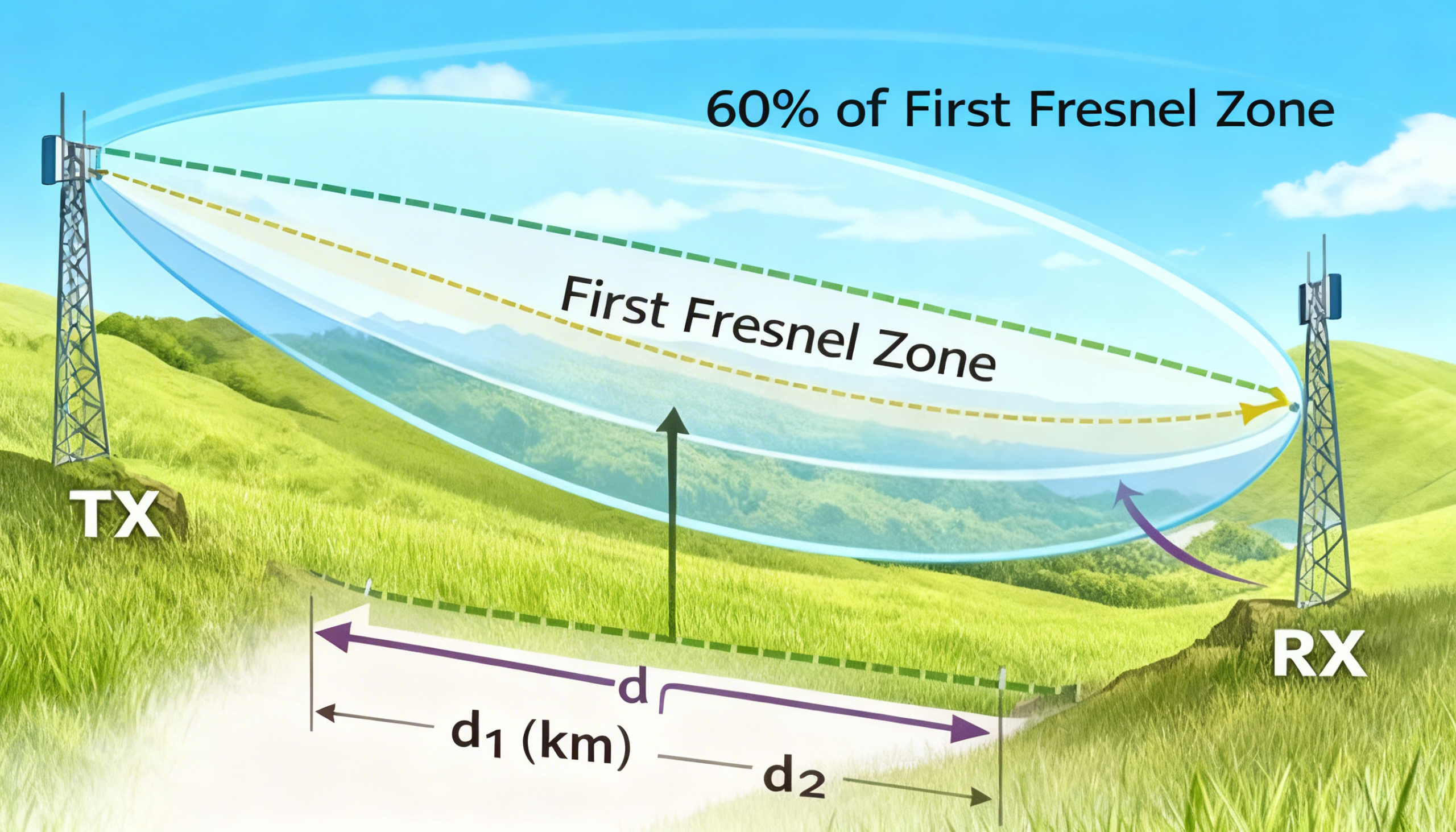
A visually clear line of sight between two antennas does not necessarily mean the complete RF path is clear. The Fresnel zone is an elliptical region around the direct path where obstructions can introduce diffraction and additional propagation loss.
The radius of the first Fresnel zone can be estimated using:
F₁ = 17.32 × √((d₁ × d₂) / (f × d))
- F₁ = first Fresnel-zone radius in metres
- d₁ = distance from endpoint one to the obstruction in kilometres
- d₂ = distance from endpoint two to the obstruction in kilometres
- d = total link distance in kilometres
- f = operating frequency in GHz
Why Fresnel Clearance Matters
Terrain, buildings, vegetation and other objects entering the Fresnel zone can reduce signal strength even when the antennas remain visually aligned. Antenna height and path clearance should therefore be evaluated as part of outdoor RF link planning.
Engineering Note: A commonly used planning objective is to keep a substantial portion of the first Fresnel zone clear. The exact requirement should be determined from the link environment, propagation conditions and reliability objective rather than treated as a universal threshold.
5. Antenna Radiation Patterns and Null Clearance
Directional antennas do not radiate RF energy equally in every direction. Their radiation patterns contain a primary lobe together with side lobes and null regions where effective antenna gain can fall substantially.
A link can therefore have adequate line-of-sight and Fresnel clearance yet still perform below expectations if antenna orientation places the remote site outside the intended portion of the antenna pattern.
This requires particular attention when:
- Using high-gain directional or dish antennas
- One site is significantly higher than the other
- A short link creates a relatively steep vertical angle
- Mechanical mounting restricts antenna tilt
Best Practice: Review the antenna radiation pattern, elevation angle, polarization and mounting geometry during design. For additional guidance, see Vizmonet’s Industrial Wireless Antenna Selection Guide →
6. Link Margin and Fade Margin
After calculating expected received power, engineers need to determine how much margin remains between the predicted signal level and the receiver level required for the intended operating mode.
The terminology link margin and fade margin is sometimes used differently across RF disciplines, vendors and planning methodologies. For this guide, link margin refers to the difference between predicted received power and the receiver requirement.
Link Margin = Received Signal − Required Receiver Level
Additional margin can help a wireless link tolerate:
- Propagation variations
- Multipath and fading
- Seasonal vegetation changes
- Installation and cable losses
- Changing interference levels
- Environmental conditions
Important: There is no universal fade-margin requirement suitable for every RF link. Required margin should be selected according to frequency, propagation environment, radio characteristics, availability target and application criticality.
7. RSSI, SNR and Modulation Capacity
Received signal strength is important, but RSSI alone does not determine wireless performance. A receiver must also distinguish the wanted signal from the surrounding RF noise.
Signal-to-noise ratio, or SNR, expresses the difference between received signal level and noise level.
SNR = Received Signal Level − Noise Floor
Wireless capacity can be influenced by:
- Received signal strength
- RF noise floor
- Signal-to-noise ratio
- Modulation and coding scheme
- Channel bandwidth
- MIMO configuration
- Interference and retransmissions
Higher-order modulation can carry more information per transmitted symbol, but it generally requires better signal quality. The exact SNR needed for a specific modulation or MCS depends on the radio architecture, wireless standard, coding rate, channel conditions and receiver implementation.
For additional context on RSSI, receiver sensitivity, EVM and other radio characteristics, see Vizmonet’s Radio Performance Metrics Guide →
8. PHY Rate vs Real Application Throughput
One common wireless planning mistake is assuming that a radio’s advertised PHY data rate is the same as usable application throughput.
Usable throughput is normally lower because the wireless connection also carries protocol and network overhead associated with:
- MAC-layer overhead
- Protocol headers
- Acknowledgements
- Retransmissions
- Guard intervals
- Channel contention
- Error recovery
- Traffic direction and packet size
The relationship between PHY rate and real throughput varies substantially depending on the radio technology, Wi-Fi generation, channel width, MIMO configuration, aggregation, interference and network loading.
Planning Principle: Size the wireless link around the application’s required usable throughput rather than relying only on the radio’s maximum advertised PHY rate.
9. Worked RF Link Budget Example
Consider a simplified outdoor point-to-point wireless link with the following design parameters:
| Parameter | Example Value |
|---|---|
| Frequency | 5 GHz |
| Distance | 10 km |
| Transmit Power | 27 dBm |
| TX Antenna Gain | 30 dBi |
| RX Antenna Gain | 30 dBi |
| Combined System Loss | 1 dB |
| Receiver Requirement | -75 dBm |
Step 1: Calculate Free-Space Path Loss
For a 10 km link operating at 5 GHz, the approximate free-space path loss is:
FSPL ≈ 126.4 dB
Step 2: Estimate Received Power
Received Power = 27 + 30 + 30 − 126.4 − 1
Estimated Received Power ≈ -40.4 dBm
Step 3: Calculate Link Margin
Link Margin = -40.4 − (-75)
Estimated Link Margin ≈ 34.6 dB
The calculation indicates substantial theoretical margin for this simplified example. However, an actual deployment must also account for terrain, Fresnel clearance, interference, antenna alignment, regulatory EIRP limits, hardware characteristics and other real-world losses.
The example therefore demonstrates the calculation process rather than guaranteeing performance for a specific deployment.
10. RF Link Budget Best Practices
Reliable wireless design requires more than inserting values into an equation. The calculation should be evaluated together with the physical RF path and deployment environment.
- Use realistic transmitter and receiver specifications.
- Include RF cable, connector and installation losses.
- Evaluate Fresnel-zone clearance, not only visual line of sight.
- Review antenna gain, radiation patterns and polarization.
- Account for the local RF noise and interference environment.
- Use receiver sensitivity for the required operating mode or MCS.
- Maintain appropriate engineering margin for the application.
- Estimate usable application throughput rather than PHY rate alone.
- Validate critical deployments through site measurements and field testing.
Common planning errors can significantly change real-world results. See Vizmonet’s Common RF Link Planning Mistakes →
11. Where RF Link Budgets Are Used
RF link-budget analysis is applicable wherever engineers need to determine whether a wireless connection can reliably operate across a defined communication path.
Wireless Backhaul
Point-to-point backhaul links depend on sufficient received signal, antenna gain, path clearance and link margin. Learn more about wireless backhaul networks.
Industrial Wireless Networks
Industrial sites use link-budget calculations when planning connections between remote equipment, gateways, access infrastructure and control systems.
Mining and Oil & Gas
Large outdoor industrial sites often require wireless links across challenging terrain and changing operational environments.
UAV and UGV Communication
Unmanned systems depend on wireless links for command, telemetry, sensor information and application data, making communication range and RF margin important design considerations.
Public Safety and Mission-Critical Networks
Mission-critical systems require careful evaluation of coverage, RF margin, interference and availability requirements before deployment.
Apply the Calculation with the Vizmonet RF Link Planner
Understanding the link-budget equation is the first step. Use the Vizmonet RF Link Planner to evaluate a proposed wireless link and compare RF parameters before moving into detailed deployment planning.
Related RF Engineering Resources
Continue exploring the RF design topics that influence practical wireless link performance.
RF Link Planning Mistakes
Industrial Wireless Antenna Selection
Radio Performance Metrics
Industrial RF Wireless Transceiver Modules
Need Help with a Real-World Wireless Design?
RF link-budget analysis helps establish technical feasibility, but production wireless systems may also require hardware selection, antenna integration, RF performance evaluation, mechanical integration, regulatory considerations and field validation.
Vizmonet supports OEMs, system integrators and industrial wireless projects with wireless products, RF engineering expertise and product integration support.
Frequently Asked Questions About RF Link Budget Calculation
These questions cover the core concepts engineers commonly evaluate when calculating RF link budgets for outdoor, point-to-point and industrial wireless links.
What is an RF link budget?
An RF link budget is an accounting of the gains and losses affecting a radio signal between a transmitter and receiver. It is used to estimate the expected received signal level and determine whether enough operating margin is available for the intended wireless connection.
How is an RF link budget calculated?
A simplified RF link budget adds transmit power and antenna gains, then subtracts propagation losses and system losses such as cable and connector loss.
Received Power = Tx Power + Tx Antenna Gain + Rx Antenna Gain − Path Loss − System Losses
What is free-space path loss in an RF link budget?
Free-space path loss, or FSPL, represents the reduction in signal power as RF energy spreads through free space. FSPL increases with both link distance and operating frequency.
For practical planning, engineers should also account for real-world losses caused by terrain, vegetation, buildings, diffraction, multipath and other environmental conditions.
What is link margin in wireless communication?
Link margin is the difference between the predicted received signal level and the receiver level required for the intended operating mode. A larger positive margin generally provides more tolerance for additional losses and changing RF conditions.
Is link margin the same as fade margin?
The terms are sometimes used differently across RF disciplines, vendors and planning tools. In many practical workflows they are closely related, but engineers should confirm how each term is defined in the specific planning methodology or radio documentation being used.
Why is Fresnel-zone clearance important?
A wireless path may have visual line of sight while still experiencing additional propagation loss if terrain, buildings, vegetation or other objects obstruct the Fresnel zone. Evaluating antenna height and path clearance is therefore important for outdoor point-to-point links.
How does antenna gain affect an RF link budget?
Antenna gain contributes to the effective signal level in the intended direction. Higher-gain directional antennas can improve a point-to-point link budget, but antenna pattern, polarization, alignment, installation height and regulatory limits must also be considered.
See Vizmonet's Industrial Wireless Antenna Selection Guide.
Why is RSSI alone not enough to predict wireless performance?
RSSI indicates received signal level, but wireless performance also depends on the surrounding noise floor and resulting signal-to-noise ratio. A strong received signal can still perform poorly if interference or RF noise is high.
Does a higher PHY rate mean higher real application throughput?
Not necessarily. Usable application throughput is normally lower than the advertised PHY rate because of protocol overhead, acknowledgements, retransmissions, contention, packet size, interference and other implementation factors.
Engineers should size a wireless link around the application's required usable throughput rather than the maximum advertised PHY rate alone.
Can an RF link budget guarantee real-world wireless performance?
No. An RF link budget provides an engineering estimate based on the parameters used in the calculation. Real-world results can also be affected by terrain, interference, antenna alignment, environmental conditions, hardware variation and installation quality.
Critical deployments should be validated through site surveys, RF measurements and field testing where appropriate.
Can I use a tool to calculate an RF link budget?
Yes. A planning tool can help engineers compare RF parameters and estimate link feasibility during early-stage design.
You can use the Vizmonet RF Link Planner to evaluate a proposed wireless link before deployment.
Where are RF link budgets commonly used?
RF link budgets are commonly used in wireless backhaul, point-to-point links, industrial wireless networks, mining and oil and gas communication systems, public safety networks, UAV and UGV communications, remote monitoring infrastructure and other outdoor wireless deployments.